Firmware + hardware integration
Large-format LED bingo display
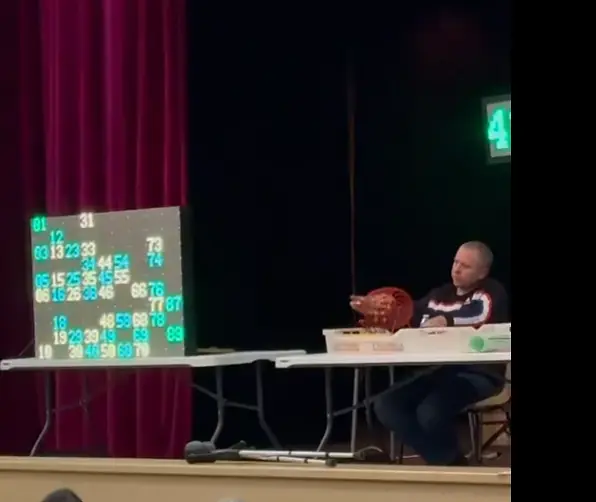
An ESP32 controls a large bingo display using WS2812 pixels. Wireless game updates select number highlights, with a pixel map linking each number to its panel position.
Engineering scope
- ESP32 display firmware and game-state handling
- Mapping game numbers to physical pixel regions
- Wireless updates and LED-panel integration
System flow
From game state to the LED panels
- Receive the updateRead the incoming Bingo game state.
- Find the numberResolve the selected number on the display map.
- Choose its pixelsAddress the corresponding panel region.
- Update the panelsShow the number’s current state.
Number-to-pixel mapping
The firmware maps game numbers to the physical panel wiring. An incoming game update selects the corresponding LED region rather than addressing the display as a simple sequential strip.
Coordinated panel updates
The project record describes more than 10,000 pixels controlled by one ESP32. The work covers wireless update handling, display-state logic and integration with the LED panels.
Installation demonstration
The project recording shows number highlighting on the physical installation. It provides a view of the display in operation alongside the installation photograph.
Firmware flow
How a Bingo number is cleared
Selected number-to-pixel clearing routine.
Accept only numbers from 1 to 90, look up the stored pixel list for that number and set those pixels to black in the LED buffer.
The routine updates the pixel buffer. It does not include the command that displays that buffer or establish installation size or frame rate.
Read the implementation
clearRows · selected source lines 156–167. Source inspection is not a hardware test.
// Clear rows for a specific number
void clearRows(int number) {
    if (number < 1 || number > 90) return;  // Ensure valid range STOP BLINK FOR MORE 90 !!!!!!

    int index = number - 1;  // Convert 1-based number to 0-based index
    int pixelCount = pgm_read_word(&numberPixelCount[index]);  // Read count from PROGMEM pgm_read_word (small)  or pgm_read_byte (original big)

    for (int i = 0; i < pixelCount; i++) {
        int pixelIndex = pgm_read_word(&numberPixels[index][i]);  // Read pixel index from PROGMEM
        strip.SetPixelColor(pixelIndex, blackColor);  // Turn off the pixel
    }
}Prototype demonstration.
Original project recording · 1:03Project enquiries
Discuss your project.
Tell us what you’re developing and where you need engineering support.